Open source · PDF debugger for macOS

Put your PDF on the couch.

pdfxray listens to every layer of the file (tags, glyphs, operators and objects) and tells you, in plain words, what’s really bothering it.

X-ray

Look under the surface.

One side of the line is what your readers see. The other is what’s really there: tags, reading order and the problems underneath.

Linked layers

Every layer, linked.

One click connects the pixel to its operator, its tag and its object.

Glyphs

Down to a single glyph.

Char code, Unicode, width and advance, and the full chain from the glyph up to its page.

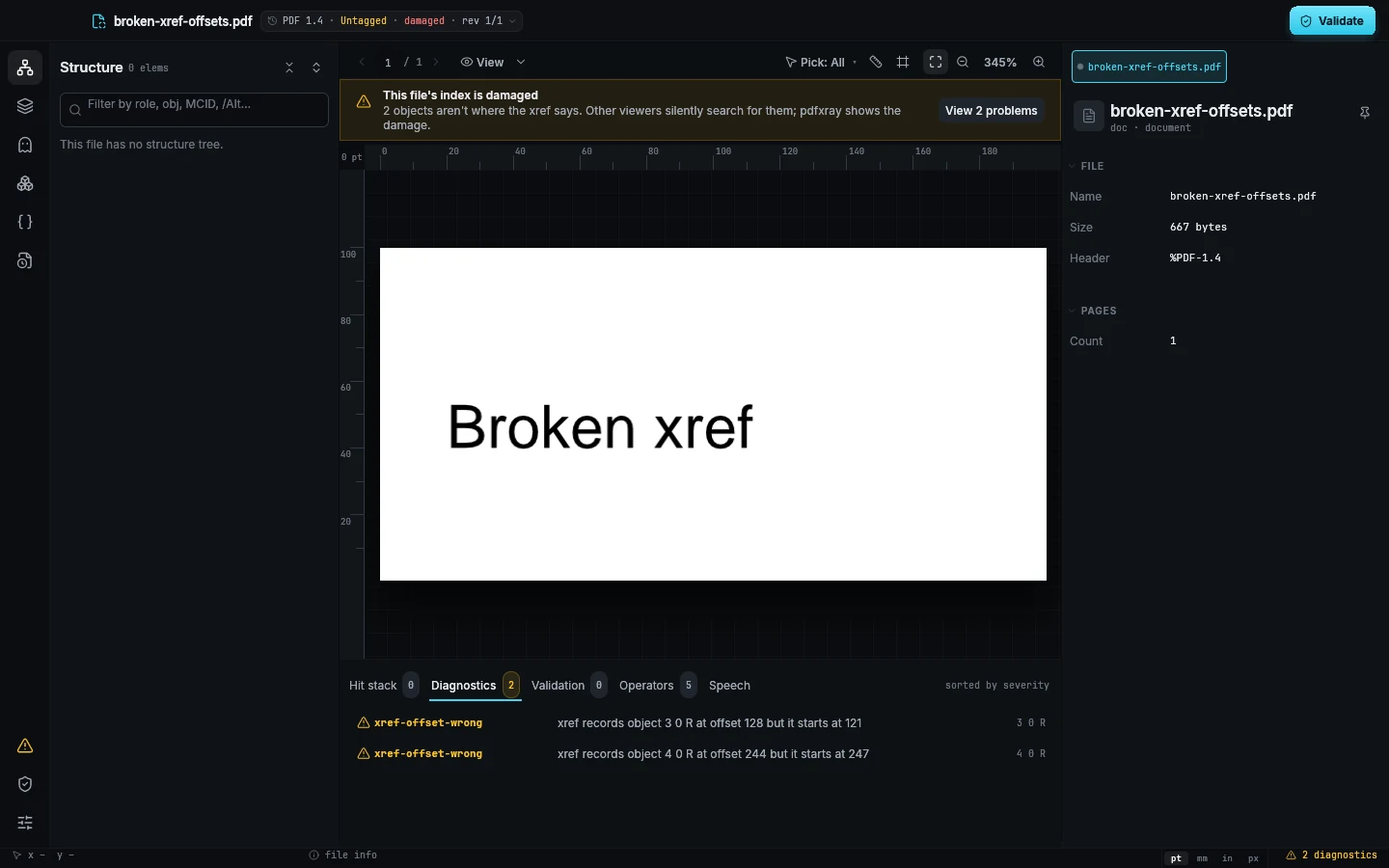
pdfxray never repairs, re-tags or optimises anything. Broken cross-reference tables, wrong offsets, orphaned marked content and role-map cycles are reported where they are, with the exact bytes involved.

Every layer of the file, linked

One click on the page.
Every answer about it.

01 · Tags & reading order

Watch the path a screen reader takes.

Tag boxes, a numbered reading path and the order listed in the inspector, from one structure tree.

1 / 3Every tag in its role colour. The tree, the page and the legend share one colour per role, and problems are flagged right in the tree.

2 / 3A backtrack turns amber. The Caption is read before its Figure, so pdfxray raises a reading-order-backtrack diagnostic.

3 / 3The order, listed and compared. Read from the structure tree, then checked against paint order to show where the two disagree.

02 · Speech

Hear the page before your readers do.

What a screen reader announces, item by item, using each reader’s substitution and skip rules.

1 / 3Pick a reader. Structure (spec), Acrobat with NVDA/JAWS, Firefox, Chrome/Edge. Everything but the spec is labelled an approximation.

2 / 3Hear it item by item. Alt replaces the Figure, the DRAFT artifact is skipped, and a footnote is flagged 6 items away from its note.

3 / 3Follow along on the page. The item being spoken is outlined on the page, in reading order.

03 · Content & glyphs

Click a glyph. Climb to its tag.

Every operator of the content stream, every glyph on the page, and the chain that connects them.

1 / 3The content stream, as a tree. Every operator in order, with untagged text like the DRAFT watermark flagged in red.

2 / 3Click a single glyph. ‘A’ U+0041 in /F1 at 26 pt, boxed with its baseline and advance.

3 / 3Every metric of that glyph. Char code, Unicode source, width, advance, ascent and descent, with the font it came from.

04 · Objects

Raw objects, explained in plain words.

The decoded drawing instructions come first. The raw bytes are one tab away.

1 / 3Problems surface in the list. Fonts that are not embedded and streams with the wrong length are flagged before you open them.

2 / 3Instructions, explained. Every operator gets a plain note: start tagged content: H1, MCID 0, draw “Annual Report 2025”.

3 / 3Diagnostics in plain words. Declared 1,200 B, actual 1,204 B. Acrobat silently fixes this; other readers may drop the last command.

05 · Measure & page boxes

Measure in pt, mm, in or px.

All five page boxes with where each comes from, and distances between anything on the page.

1 / 3Where every box comes from. MediaBox, CropBox, BleedBox, TrimBox and ArtBox: set on the page, inherited or defaulted.

2 / 3Measure anything. Drag for a distance, Shift-click a second item for the gap. Hold Shift to snap to 45°.

3 / 3Gap and alignment, in numbers. 29.1 pt apart, left edges aligned, in every unit at once, plus trim and bleed for print.

06 · Validation

veraPDF findings, on the exact node.

veraPDF runs as a separate process. Every failure lands on the element it is about.

1 / 3Grouped by rule. 9 failed, 3 rules, 1,284 passed, with each finding listed under its rule.

2 / 3On the exact node. Badges sit on the element, operator or font that failed.

3 / 3Why it matters, how to fix it. In plain words, with an example fix. pdfxray never changes your file.

07 · Paint order

Replay the page, one operator at a time.

Step through the content stream and watch each item land on the page.

1 / 3Step through the stream. Step 211 of 377. Arrow keys step, Shift jumps to the next visible change.

2 / 3Watch it land. The current item is outlined. Whatever is painted later is ghosted.

3 / 3Know what covers it. 82% visible, 18% under the watermark: covered later by op #355 “DRAFT”.

Small things we cared about

The details are the product.

Every label explains itself

Hover a property name to see what it means in plain words. No manual needed for Tz, TL, W n or a CTM.

References look like references

Marked-content rows stay visible but dimmed and can't be selected: they point to content, they aren't tags.

Quiet until you need it

Copy buttons appear on hover. Default values fold into one line. Problems come first.

One units switch

Set it once in the status bar and every value in the app follows.

Pick what a click selects

All, Tags, Content, Boxes or Artifacts, with keys 1–6. The page looks the same; only the click changes.

Keys, shown as keys

Every icon-only tool says its name and shortcut. Shift snaps the measure line to 45°.

Every revision, still there

Incremental updates keep old objects in the file. The revision chip lists them, and changed objects are badged.

Built for broken files

Other viewers quietly fix.
pdfxray shows the damage.

A lossless syntax layer keeps every byte span. When the index points to the wrong offset or a stream lies about its length, you see where, and why other readers may behave differently.

  • 12CLI commands over the same query API
  • 1,167tests: unit, property, fixture, visual and end-to-end
  • 0GPL or AGPL dependencies
pdfxray reporting a damaged cross-reference table

For scripts, CI and agents

The same answers, as JSON.

The CLI exposes the queries the app uses. Below: real values from a test fixture, trimmed to the key fields.

pdfxray app icon

MIT licensed · written in Rust

Open the file. See everything.

pdfxray v1 is for macOS 11 or later, on Apple Silicon and Intel. Download the notarized app, which keeps itself up to date, or build it from source with the pinned toolchain.

$ cargo run -p pdfxray-app -- file.pdf
$ cargo run -p pdfxray-cli -- info file.pdf --pretty

Not in v1: decrypting encrypted files (their structure is still shown) and the annotation, form and outline panels, which are planned for v1.1.